Ledge
Version 0.10.4 · macOS, Windows, Linux

Notes on the edge
of your screen.

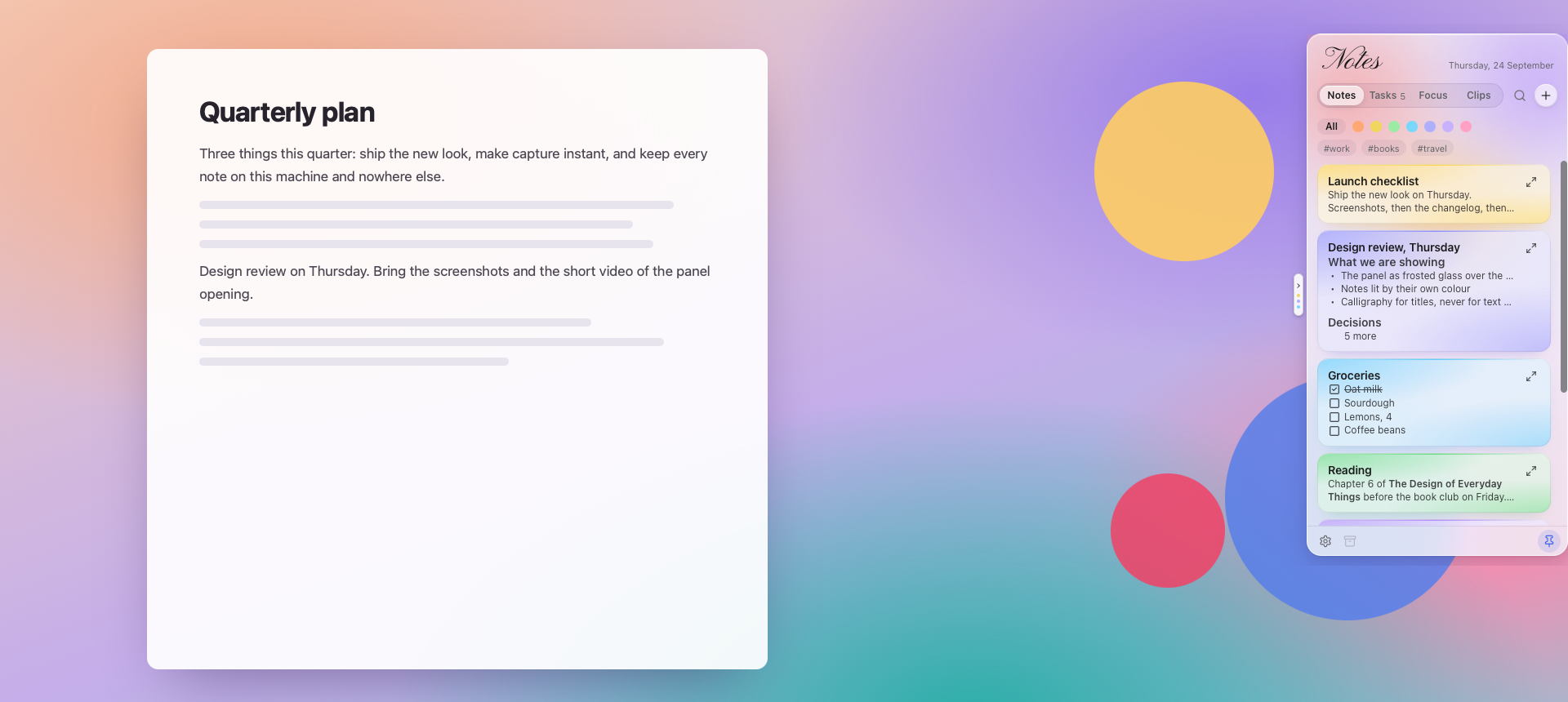
A small tab sits against the screen edge, above whatever you are working in. Point at it and a panel of frosted glass slides out, with your notes lit by their colours. Move away and it slides back.

Download for free See what it does

No account, no sync, no telemetry. Your notes are an encrypted file on your own disk.

The Ledge panel open on the right-hand edge of a screen: frosted glass over the desktop, the word Notes written in calligraphy, and notes lit by their own colours.

Always within reach

It floats above other windows and follows you across desktops and full-screen apps, so it is one small movement away — not a window to find, raise and put back.

Never in the way

Collapsed, it is a pill at the edge. Opening it takes no focus from what you are typing in, and it slides away by itself the moment you leave.

Yours, and locked

Notes are Markdown in a local database, encrypted with a key kept in your system's keychain. The only thing the app asks the network is whether there is a new version.

See it move

Glass that answers you

Short clips of the real app, on invented notes.

At a glance Point at the tab and the glass slides out; leave and it slides away.
In a new light Start a session and the panel warms; take a break and it cools.
In a moment A note is a press away, and it saves as you type.

Four tabs

One panel of glass

Notes, tasks, a focus timer and what you just copied: the things you reach for while you are in the middle of something else.

Notes

Notes, lit by their colour

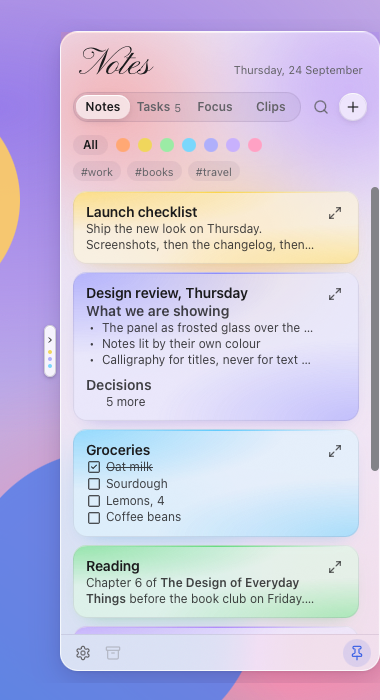
Every note is a card of the same frosted glass as the panel, and its colour is light rather than paint: a glow from its corner and a thin lit line along its top. Sixteen colours, plus none at all. The dots under the tabs filter by colour, a #tag in a note filters by tag, and ⌘F searches.

Deleting is undoable twice over: a toast with an Undo in it, and then the Archive at the foot of the panel, which keeps everything deleted in the last thirty days.

The Notes tab: glass cards, each lit by its own colour, with a checklist, tags and a colour filter.

Write

Rich text in, plain Markdown out

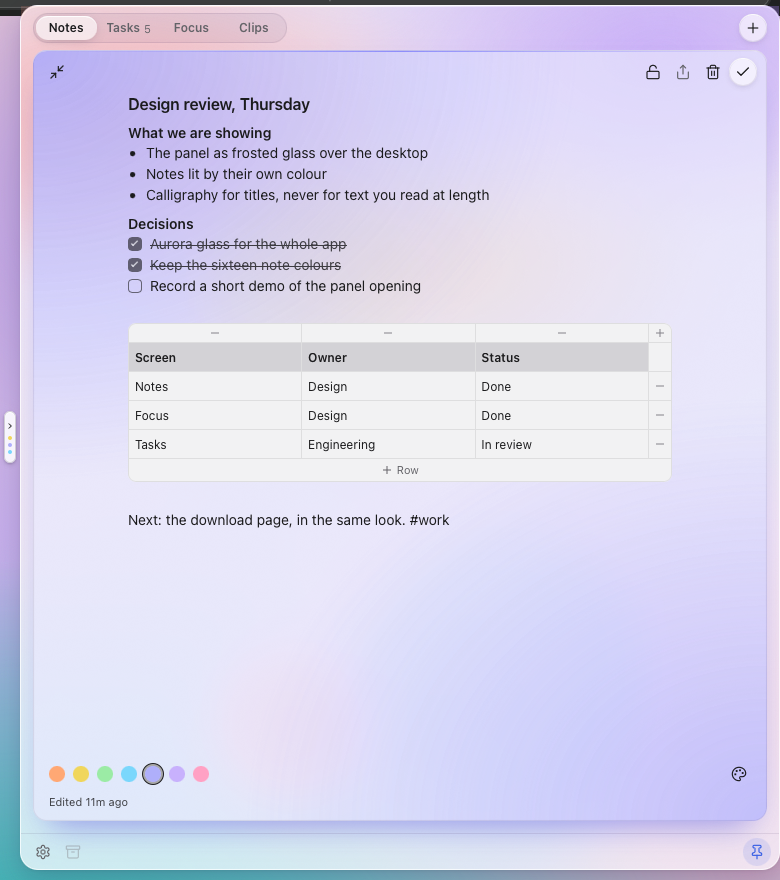
Headings with ⌘⌥1, bold with ⌘B, lists with ⌘⇧8, or type / for a menu of blocks: code with syntax colour for sixteen languages, tables, pictures you paste or drop in. What is stored is still Markdown, byte for byte.

Need room? Expand the note and the panel itself grows into a writing sheet.

A note expanded to fill a large panel, with headings, a checklist and a table.

Tasks

Tasks that know what day it is

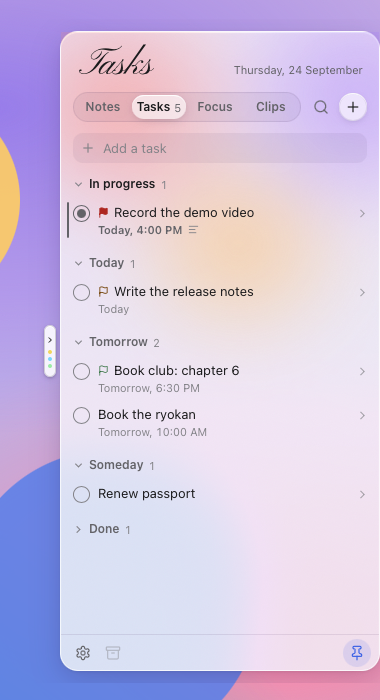
Tasks are their own list: In progress at the top, then Today, Tomorrow, Upcoming and Someday, with Done and Cancelled folded away.

Type the details straight into the add field (@tomorrow, 2pm, !high) and see them read back as chips before you press Return.

The Tasks tab: In progress, Today, Tomorrow and Someday, with priority flags and due times.

Details

Four statuses, not one tick

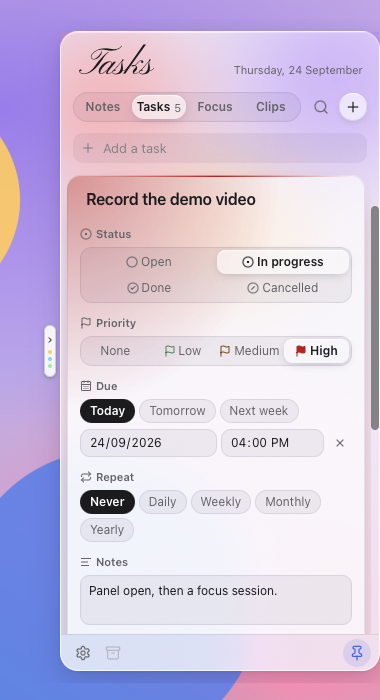
A task is Open, In progress, Done or Cancelled, and its sheet glows in the colour of its priority. Underneath: a due date and time, a repeat that moves the task on when you tick it, notes, and a door straight to the focus timer.

A task's sheet, glowing red for high priority: status, priority, due date and time, repeat and notes.

Focus

A timer that changes the light

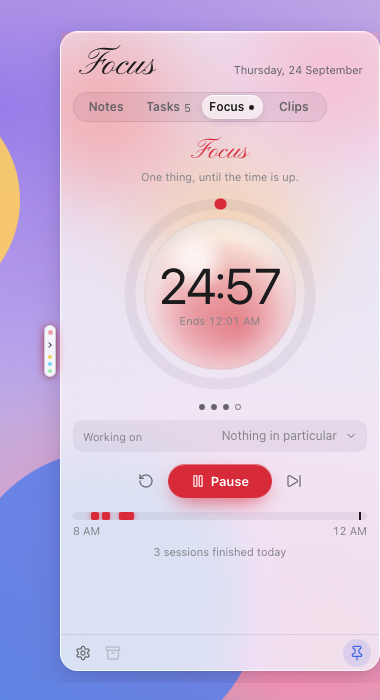
A pomodoro in a glass sphere. While a session runs the whole panel warms; on a break it turns teal, and on the long one, indigo. Presets for 25/5, 50/10 and 90/20, a timeline of what you finished today, and a countdown in the menu bar.

It keeps an end time rather than counting down, so a session that ran out while the panel was closed still ends when it should.

The Focus tab mid-session: a glass sphere inside a glowing red ring, the time left, and today's sessions on a timeline.

Clips

What you copied, a moment ago

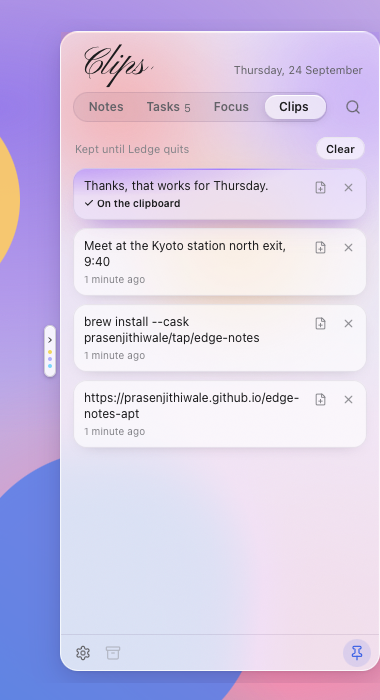
The last fifty texts you copied, so the one before last is one press away. They are kept in memory only, never written to disk, and anything a password manager marks as secret is never kept at all.

The Clips tab: the last few copied texts as glass tiles, the one on the clipboard lit.

Yours

It goes where you want it

Left edge or right, on whichever monitor, opening on hover or on a click. Pick a colour and it becomes the light under the glass. There is a Keep open pin, a tray icon, and a global shortcut (⌘⌥N) that opens it with a new note ready.

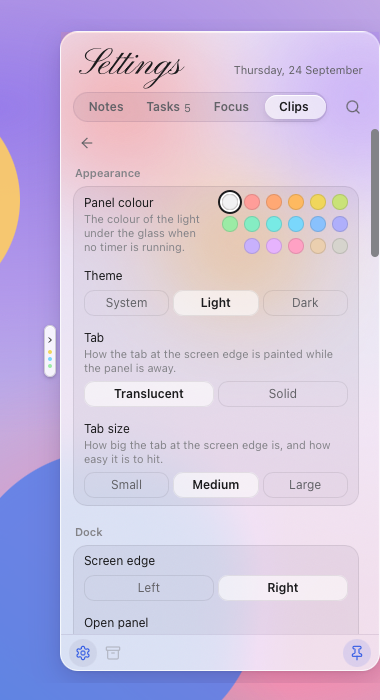
Settings: the panel colour, light or dark, the tab's look and size, and the docked edge.

Night

Dark, too

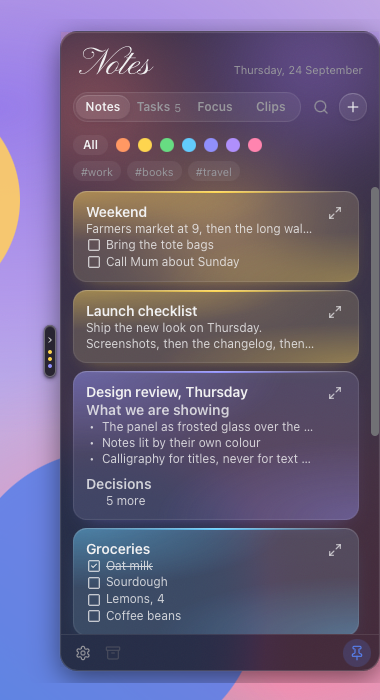
In dark mode the glass smokes over and each note's colour glows instead of tinting, so sixteen colours still read as sixteen. Every text colour is held to WCAG AA contrast by a test rather than by eye.

The same notes in dark mode: smoked glass, with each note's colour glowing brighter.

Hands stay on the keys

Nothing essential is hidden behind hover, and the panel is driven from the keyboard once it is open.

Open with a new note, from anywhere ⌘⌥N
Search the list in front of you ⌘F
New note, or new task ⌘N
Move through the cards or rows ↑ ↓
Tick the task you are on Space
Close the editor, then the panel Esc
Bold, italic, strikethrough, code ⌘B ⌘I ⌘⇧X ⌘E
Bulleted, numbered, to-do list ⌘⇧8 ⌘⇧7 ⌘⇧9
Code block ⌘⇧C
Turn the line into something else /
Start or stop the focus timer Space
Reset it, or skip the phase R S

On Windows and Linux, Ctrl where this says ⌘.

Download

Free, and the same app on all three. Installing from Homebrew or apt also keeps it up to date.

macOS

Version 0.10.4 · macOS 12 Monterey or later · Apple silicon and Intel in one build

Homebrew is the easier route, and brings new versions with brew upgrade:

brew trust --cask prasenjithiwale/tap/edge-notes
brew install --cask prasenjithiwale/tap/edge-notes

Homebrew will not load a cask from a tap outside its own repositories until you say you trust it, which is what the first line is; the second adds the tap and installs. Afterwards it is just edge-notes, as in brew upgrade edge-notes.

Or take the disk image and drag the app to Applications:

Disk image (.dmg) 12.4 MB

Gatekeeper. These builds are not signed with an Apple Developer ID and are not notarised, so macOS will not open the app while it carries the quarantine flag that anything downloaded gets. The Homebrew cask removes that flag for you — which also means the app is installed without a Gatekeeper check, so install it only if you trust this site. After the .dmg, do it yourself once:

xattr -dr com.apple.quarantine "/Applications/Ledge.app"

Check a download against SHA256SUMS with shasum -a 256. To remove the app: brew uninstall --cask edge-notes, or drag it to the Bin.

Windows

Version 0.10.4 · Windows 10 and 11 · 64-bit

Installer (.exe) 3.8 MB Package (.msi) 5.2 MB

The installer is the usual choice; the .msi is there for deploying it across a fleet. Both install the same app, and fetch the WebView2 runtime if Windows does not already have it.

SmartScreen. These builds are not code-signed, so Windows warns the first time: choose More info, then Run anyway.

Check a download against SHA256SUMS with Get-FileHash in PowerShell.

Debian and Ubuntu

Version 0.10.4 · Debian 12+, Ubuntu 22.04+, Kubuntu and derivatives · x86_64

This page is also a signed APT repository, so new versions arrive with sudo apt update && sudo apt upgrade like anything else on the system:

sudo install -d -m 0755 /etc/apt/keyrings
curl -fsSL https://prasenjithiwale.github.io/edge-notes-apt/key.gpg | sudo gpg --dearmor -o /etc/apt/keyrings/ledge.gpg
echo "deb [arch=amd64 signed-by=/etc/apt/keyrings/ledge.gpg] https://prasenjithiwale.github.io/edge-notes-apt stable main" \
  | sudo tee /etc/apt/sources.list.d/ledge.list
sudo apt update
sudo apt install ledge

The app was called Edge Notes until 0.1.0 and its package was edge-notes. If you installed that one, the line above replaces it: ledge declares Replaces and Conflicts on the old name, so apt takes it out rather than leaving both installed. Your notes come across on first launch.

To remove it: sudo apt remove ledge, then sudo rm /etc/apt/sources.list.d/ledge.list /etc/apt/keyrings/ledge.gpg. On Wayland the app runs through XWayland; LEDGE_NATIVE_WAYLAND=1 opts out of that.

The APT repository is signed by "Edge Notes APT repository" (named before the app was), RSA 4096, fingerprint BA717EAAFC819ABAB0ED6B517A4EFAFF5DAC007C.

Open source, closed to contributions

Ledge is free and open source under the MIT licence, and the code is on GitHub. It is not open to contributions: no pull requests, and no feature requests taken as a queue. This is one person's app, built to one set of opinions about what it should be, and keeping it that way is most of why it stays small and why it does what it does.

Bug reports are the exception and they are welcome — if something is broken, open an issue and say what happened, with the version and system from Settings › About. Everything else about a release — what changed, what is known to be broken — is in the changelog.

What it does not do

There is no account, no cloud and no sync: notes live in an encrypted SQLite file in the app's own data folder, and nothing leaves the machine. The clipboard history is kept in memory only, and the panel is hidden from screen shares and screenshots unless you say otherwise. The window that draws the panel is given no filesystem, shell or database access of its own — everything stateful is handled by the native side, and links open in your browser rather than inside the app.

It is a young project, and while the version is 0.x a release may change how something behaves. Deleted notes and tasks are kept for thirty days so an undo always has something to undo, and every release is listed with its changes in the changelog.

Signed

Code signing policy

Free code signing provided by SignPath.io, certificate by SignPath Foundation. Ledge has applied to the programme; until it is approved the Windows installers are unsigned, and Windows says so the first time.

Only what the release workflow builds from a tagged commit in the public repository is signed, and every signing request is approved by hand. The macOS and Linux packages are signed separately: the Debian repository with the key shown under Download, and every update with the app's own updater key.

Committers and reviewers: Prasenjit Hiwale
Approvers: Prasenjit Hiwale

Private

Privacy

Your notes, tasks, focus sessions and clipboard history never leave your computer. There is no account, no analytics and no crash reporting.

Ledge makes one kind of network request on its own: a minute after it starts and once a day after that, it downloads a small file, updates/latest.json, from this site to see whether there is a new version. Nothing about you or your notes is sent with it; like any web request, GitHub, which hosts this site, sees your IP address. A new version is only downloaded when you choose to install it. Copies installed with apt do not check at all, since apt updates them.

A link in a note opens in your browser, and only when you click it.