kaffy
A terminal UI for exploring and operating Kafka clusters. Follow messages live, jump to any offset or time, read Avro and Protobuf through your Schema Registry, keep an eye on consumer lag, and manage schemas and topics. For Linux and macOS.
curl -fsSL https://prasenjithiwale.github.io/folio/kaffy/install.sh | sh
brew trust --formula prasenjithiwale/tap/kaffy && brew install prasenjithiwale/tap/kaffy
Latest release v0.1.0, . Linux (x86_64, arm64) and macOS. Other ways to install · Source on GitHub
 ◆ kaffy  demo  ✎ WRITE  ● connected · 3 brokers  topic orders     1 Topics   2 Groups   3 Schemas   4 Brokers
╭ orders ───────── 3 partitions · from last 100 per partition · 313 buffered (max 5000) · 313 received  ● LIVE ╮
│     P  OFFSET  TIMESTAMP                KEY       VALUE                                                      │
│     1     397  2026-10-15 15:14:58.480  cust-067  {"order_id":"ord-1-000397","customer":"cust-067","status": │
│     2     397  2026-10-15 15:14:58.480  cust-109  {"order_id":"ord-2-000397","customer":"cust-109","status": │
│     0     398  2026-10-15 15:14:59.980  cust-062  {"order_id":"ord-0-000398","customer":"cust-062","status": │
│     1     398  2026-10-15 15:14:59.980  cust-222  {"order_id":"ord-1-000398","customer":"cust-222","status": │
│     2     398  2026-10-15 15:14:59.980  cust-007  {"order_id":"ord-2-000398","customer":"cust-007","status": │
│     0     399  2026-10-15 15:15:01.480  cust-221  ∅ tombstone                                                │
│     1     399  2026-10-15 15:15:01.480  cust-070  ∅ tombstone                                                │
│     2     399  2026-10-15 15:15:01.480  cust-025  ∅ tombstone                                                │
│     1     400  2026-10-15 15:15:03.273  cust-225  {"order_id":"ord-1-000400","customer":"cust-225","status": │
│     0     400  2026-10-15 15:15:03.393  cust-235  {"order_id":"ord-0-000400","customer":"cust-235","status": │
│     1     401  2026-10-15 15:15:03.514  cust-053  {"order_id":"ord-1-000401","customer":"cust-053","status": │
│     2     400  2026-10-15 15:15:03.635  cust-064  {"order_id":"ord-2-000400","customer":"cust-064","status": │
│     1     402  2026-10-15 15:15:03.754  cust-021  {"order_id":"ord-1-000402","customer":"cust-021","status": │
│     0     401  2026-10-15 15:15:03.875  cust-224  {"order_id":"ord-0-000401","customer":"cust-224","status": │
│     2     401  2026-10-15 15:15:03.995  cust-077  {"order_id":"ord-2-000401","customer":"cust-077","status": │
│     1     403  2026-10-15 15:15:04.114  cust-091  {"order_id":"ord-1-000403","customer":"cust-091","status": │
│     1     404  2026-10-15 15:15:04.234  cust-024  {"order_id":"ord-1-000404","customer":"cust-024","status": │
│     0     402  2026-10-15 15:15:04.355  cust-122  {"order_id":"ord-0-000402","customer":"cust-122","status": │
│     1     405  2026-10-15 15:15:04.475  cust-129  {"order_id":"ord-1-000405","customer":"cust-129","status": │
│     1     406  2026-10-15 15:15:04.595  cust-040  {"order_id":"ord-1-000406","customer":"cust-040","status": │
│ ▌   0     403  2026-10-15 15:15:04.714  cust-210  {"order_id":"ord-0-000403","customer":"cust-210","status": │
╰──────────────────────────────────────────────────────────────────────────────────────────────────────────────╯
 ↑↓  move   ⏎  open   space  pause   /  filter   p  produce   E  edit & produce   :  commands   ?  keys
Opening a topic shows the last 100 messages of each partition, then follows new ones as they arrive.
 ◆ kaffy  demo  ✎ WRITE  ● connected · 3 brokers  topic orders     1 Topics   2 Groups   3 Schemas   4 Brokers
╭ orders ─────────────────────── 3 partitions  filter: ~"status":"(PAID|SHIPPED)" p:0,1 · 110 match  ❚❚ PAUSED ╮
│     P  OFFSET  TIMESTAMP                KEY       VALUE                                                      │
│     1     384  2026-10-15 15:14:38.980  cust-203  {"order_id":"ord-1-000384","customer":"cust-203","status": │
│     0     385  2026-10-15 15:14:40.480  cust-041  {"order_id":"ord-0-000385","customer":"cust-041","status": │
│     0     386  2026-10-15 15:14:41.980  cust-229  {"order_id":"ord-0-000386","customer":"cust-229","status": │
│     1     387  2026-10-15 15:14:43.480  cust-129  {"order_id":"ord-1-000387","customer":"cust-129","status": │
│     0     388  2026-10-15 15:14:44.980  cust-046  {"order_id":"ord-0-000388","customer":"cust-046","status": │
│     1     390  2026-10-15 15:14:47.980  cust-071  {"order_id":"ord-1-000390","customer":"cust-071","status": │
│     0     391  2026-10-15 15:14:49.480  cust-155  {"order_id":"ord-0-000391","customer":"cust-155","status": │
│     1     391  2026-10-15 15:14:49.480  cust-010  {"order_id":"ord-1-000391","customer":"cust-010","status": │
│     1     392  2026-10-15 15:14:50.980  cust-141  {"order_id":"ord-1-000392","customer":"cust-141","status": │
│     0     393  2026-10-15 15:14:52.480  cust-193  {"order_id":"ord-0-000393","customer":"cust-193","status": │
│     0     394  2026-10-15 15:14:53.980  cust-162  {"order_id":"ord-0-000394","customer":"cust-162","status": │
│     1     394  2026-10-15 15:14:53.980  cust-006  {"order_id":"ord-1-000394","customer":"cust-006","status": │
│     0     395  2026-10-15 15:14:55.480  cust-075  {"order_id":"ord-0-000395","customer":"cust-075","status": │
│     0     396  2026-10-15 15:14:56.980  cust-058  {"order_id":"ord-0-000396","customer":"cust-058","status": │
│     1     397  2026-10-15 15:14:58.480  cust-067  {"order_id":"ord-1-000397","customer":"cust-067","status": │
│     0     398  2026-10-15 15:14:59.980  cust-062  {"order_id":"ord-0-000398","customer":"cust-062","status": │
│     0     400  2026-10-15 15:15:03.393  cust-235  {"order_id":"ord-0-000400","customer":"cust-235","status": │
│     0     401  2026-10-15 15:15:03.875  cust-224  {"order_id":"ord-0-000401","customer":"cust-224","status": │
│     1     403  2026-10-15 15:15:04.114  cust-091  {"order_id":"ord-1-000403","customer":"cust-091","status": │
│     1     404  2026-10-15 15:15:04.234  cust-024  {"order_id":"ord-1-000404","customer":"cust-024","status": │
│ ▌   1     405  2026-10-15 15:15:04.475  cust-129  {"order_id":"ord-1-000405","customer":"cust-129","status": │
╰──────────────────────────────────────────────────────────────────────────────────────────────────────────────╯
 ↑↓  move   ⏎  open   space  pause   /  filter   p  produce   E  edit & produce   :  commands   ?  keys
Filters combine plain words, regular expressions, fields, partitions and time ranges. Here: orders that are paid or shipped, on partitions 0 and 1.
 ◆ kaffy  demo  ✎ WRITE  ● connected · 3 brokers  topic sensor-readings                   1 Topics   2   3   4
╭ sensor-readings · p2 · offset 403 ───────────────────────────────────────────────────────────────────────────╮
│ Topic      sensor-readings                                                                                   │
│ Partition  2                                                                                                 │
│ Offset     403                                                                                               │
│ Timestamp  2026-10-15 15:15:06.663  (1792057506663)                                                          │
│ Key        sensor-7  (text)                                                                                  │
│ Headers    none                                                                                              │
│                                                                                                              │
│ VALUE  (avro · schema 7, 25 bytes)                                                                           │
│                                                                                                              │
│ {                                                                                                            │
│   "sensor": "sensor-7",                                                                                      │
│   "celsius": 30.1,                                                                                           │
│   "battery": 51,                                                                                             │
│   "state": "OK"                                                                                              │
│ }                                                                                                            │
│                                                                                                              │
│                                                                                                              │
│                                                                                                              │
│                                                                                                              │
│                                                                                                              │
│                                                                                                              │
│                                                                                                              │
╰──────────────────────────────────────────────────────────────────────────────────────────────────────────────╯
 ↑↓  move   p  produce   E  edit & produce   esc  back   :  commands   ?  keys
A message encoded with Avro, decoded through the Schema Registry and shown as JSON next to its key, headers and timestamp.
 ◆ kaffy  demo  ✎ WRITE  ● connected · 3 brokers                   1 Topics   2 Groups   3 Schemas   4 Brokers
╭ Consumer groups 4 ─────────────────────────────────────────────────────────────────────────────── ↻ every 5s ╮
│   GROUP               STATE          MEMBERS  TOPICS                           LAG  TREND                    │
│ ▌ analytics-backfill  ○ Empty              0  orders, user-events            1,632  ▁▁▁▂▂▃▄▄▅▅▆▆▇██          │
│   orders-service      ● Stable             3  orders                           105  ▁▁▂▃▃▄▅▅▆▆▇▇▇██          │
│   payment-processor   ● Stable             2  payments                          17  ██████▆▇▆▆▅▄▃▂▁          │
│   sensor-alerts       ● Stable             1  sensor-readings                  921  ███▇▇▇▆▆▅▄▄▃▂▂▁          │
│                                                                                                              │
│                                                                                                              │
│                                                                                                              │
│                                                                                                              │
│                                                                                                              │
│                                                                                                              │
│                                                                                                              │
│                                                                                                              │
│                                                                                                              │
│                                                                                                              │
│                                                                                                              │
│                                                                                                              │
│                                                                                                              │
│                                                                                                              │
│                                                                                                              │
│                                                                                                              │
│                                                                                                              │
╰──────────────────────────────────────────────────────────────────────────────────────────────────────────────╯
 ↑↓  move   ⏎  open   /  filter   R  reset offsets   r  refresh   :  commands   ?  keys
Every consumer group with its state, members and total lag, refreshed every 5 seconds. The trend shows whether a group is catching up or falling behind.
 ◆ kaffy  demo  ✎ WRITE  ● connected · 3 brokers                   1 Topics   2 Groups   3 Schemas   4 Brokers
╭ analytics-backfill ────────────────────────╮╭ Total lag, last 22 refreshes ─────────────────── 1,536 – 1,668 ╮
│ State     ○ Empty                          ││                ▁▁▂▄▅▆█                                         │
│ Total lag 1,668                            ││           ▂▃▄▇████████                                         │
│ Topics    orders, user-events              ││      ▂▃▄▆█████████████                                         │
│ Members   none                             ││ ▄▄▅▆▇█████████████████                                         │
│                                            ││ ██████████████████████                                         │
│ No members, so offsets can be reset with R ││ ██████████████████████                                         │
│                                            ││ ██████████████████████                                         │
╰────────────────────────────────────────────╯╰────────────────────────────────────────────────────────────────╯
╭ Partitions 6 ────────────────────────────────────────────────────────────────────────────────────────────────╮
│   TOPIC        PARTITION       COMMITTED      END OFFSET           LAG                                       │
│ ▌ orders               0             140             433           293  ━━━━━━━━━━━━━━━━                     │
│   orders               1             155             433           278  ━━━━━━━━━━━━━━━─                     │
│   orders               2             170             433           263  ━━━━━━━━━━━━━━──                     │
│   user-events          0             140             433           293  ━━━━━━━━━━━━━━━━                     │
│   user-events          1             155             433           278  ━━━━━━━━━━━━━━━─                     │
│   user-events          2             170             433           263  ━━━━━━━━━━━━━━──                     │
│                                                                                                              │
│                                                                                                              │
│                                                                                                              │
│                                                                                                              │
│                                                                                                              │
│                                                                                                              │
╰──────────────────────────────────────────────────────────────────────────────────────────────────────────────╯
 ↑↓  move   R  reset offsets   r  refresh   esc  back   :  commands   ?  keys
One group's lag per partition, its members, and a chart of total lag over time. This group has stopped, so its lag keeps growing.
 ◆ kaffy  demo  ✎ WRITE  ● connected · 3 brokers                   1 Topics   2 Groups   3 Schemas   4 Brokers
╭ analytics-backfill ────────────────────────╮╭ Total lag, last 22 refreshes ─────────────────── 1,536 – 1,668 ╮
│ State     ○ Empty                          ││                ▁▁▂▄▅▆█                                         │
│ Total lag 1,668                            ││           ▂▃▄▇████████                                         │
│ Topics    orders, user-events              ││      ▂▃▄▆█████████████                                         │
│ Members   none                             ││ ▄▄▅▆▇█████████████████                                         │
│                  ╭ ▲ Reset offsets of analytics-backfill ─────────────────────────────────╮                  │
│ No members, so of│ Move to the earliest offset                                            │                  │
│                  │                                                                        │                  │
╰──────────────────│ Topic                       P      Current          New    Lag after   │──────────────────╯
╭ Partitions 6 ────│ orders                      0          140            0          434   │──────────────────╮
│   TOPIC        PA│ orders                      1          155            0          434   │                  │
│ ▌ orders         │ orders                      2          170            0          434   │                  │
│   orders         │ user-events                 0          140            0          434   │                  │
│   orders         │ user-events                 1          155            0          434   │                  │
│   user-events    │ user-events                 2          170            0          434   │                  │
│   user-events    │                                                                        │                  │
│   user-events    │ Consumers will process 930 message(s) again.                           │                  │
│                  │                                                                        │                  │
│                  │  y  reset   esc  cancel                                                │                  │
│                  ╰────────────────────────────────────────────────────────────────────────╯                  │
│                                                                                                              │
│                                                                                                              │
│                                                                                                              │
╰──────────────────────────────────────────────────────────────────────────────────────────────────────────────╯
 ↑↓  move   R  reset offsets   r  refresh   esc  back   :  commands   ?  keys
Resetting offsets starts with a preview of every partition and how many messages consumers will process again. Nothing changes until you confirm.
 ◆ kaffy  demo  ✎ WRITE  ● connected · 3 brokers                   1 Topics   2 Groups   3 Schemas   4 Brokers
╭ Topics 5 ────────────────────────────────────────────────────────────────────────────────────────────────────╮
│   NAME                           PARTITIONS   REPLICATION   HEALTH                                           │
│   __consumer_offsets  internal            3             3   ● healthy                                        │
│ ▌ orders                                  3             3   ● healthy                                        │
│   payments                                3             3   ● healthy                                        │
│   sensor-readings                         3             3   ▲ 1 under-replicated                             │
│   user-events                             3             3   ● healthy                                        │
│                                                                                                              │
╰──────────────────────────────────────────────────────────────────────────────────────────────────────────────╯
╭ orders · partitions ─────────────────────────────────────────────────────────────────────────────────────────╮
│   PARTITION   LEADER   REPLICAS         IN SYNC          STATUS                                              │
│           0        1   1, 2, 3          1, 2, 3          ● in sync                                           │
│           1        2   1, 2, 3          1, 2, 3          ● in sync                                           │
│           2        3   1, 2, 3          1, 2, 3          ● in sync                                           │
│                                                                                                              │
│                                                                                                              │
│                                                                                                              │
│                                                                                                              │
│                                                                                                              │
│                                                                                                              │
│                                                                                                              │
│                                                                                                              │
│                                                                                                              │
╰──────────────────────────────────────────────────────────────────────────────────────────────────────────────╯
 ↑↓  move   ⏎  open   /  filter   c  config   n  new topic   D  delete   :  commands   ?  keys
Every topic with its partition count, replication factor and under-replicated partitions.
 ◆ kaffy  demo  ✎ WRITE  ● connected · 3 brokers                   1 Topics   2 Groups   3 Schemas   4 Brokers
╭ Versions ──────────╮╭ sensor-readings-value · changes from v1 to v2 ─────────────────────────────────────────╮
│   v1    id 6       ││         "name": "celsius",                                                             │
│ ▌ v2    id 7       ││         "type": "double"                                                               │
│                    ││       },                                                                               │
│                    ││       {                                                                                │
│                    ││ +       "name": "battery",                                                             │
│                    ││ +       "type": [                                                                      │
│                    ││ +         "null",                                                                      │
│                    ││ +         "int"                                                                        │
│                    ││ +       ],                                                                             │
│                    ││ +       "default": null                                                                │
│                    ││ +     },                                                                               │
│                    ││ +     {                                                                                │
│                    ││         "name": "state",                                                               │
│                    ││         "type": {                                                                      │
│                    ││           "type": "enum",                                                              │
│                    ││           "name": "State",                                                             │
│                    ││           "symbols": [                                                                 │
│                    ││             "OK",                                                                      │
│                    ││             "WARN",                                                                    │
│                    ││             "FAIL"                                                                     │
│                    ││           ]                                                                            │
│                    ││         }                                                                              │
╰ compat BACKWARD ───╯╰────────────────────────────────────────────────────────────────────────────────────────╯
 ↑↓  move   d  diff with previous   e  edit & register   r  refresh   esc  back   :  commands   ?  keys
A subject's versions in the Schema Registry, with the changes from v1 to v2. e edits the latest schema, checks compatibility and registers it once you confirm.
 ◆ kaffy  demo  ✎ WRITE  ● connected · 3 brokers                   1 Topics   2 Groups   3 Schemas   4 Brokers
╭ orders · config ──────────────────────────────────────────────────── 1 set on this topic, the rest inherited ╮
│   SETTING                          VALUE                                                            FROM     │
│ ▌ cleanup.policy                   delete                                                           default  │
│   compression.type                 producer                                                         default  │
│   delete.retention.ms              86400000                                                         default  │
│   max.message.bytes                1048588                                                          default  │
│   min.insync.replicas              1                                                                default  │
│   retention.bytes                  -1                                                               default  │
│   retention.ms                     259200000                                                        ● topic  │
│   segment.bytes                    1073741824                                                       default  │
│                                                                                                              │
│                                                                                                              │
│                                                                                                              │
│                                                                                                              │
│                                                                                                              │
│                                                                                                              │
│                                                                                                              │
│                                                                                                              │
│                                                                                                              │
│                                                                                                              │
│                                                                                                              │
│                                                                                                              │
│                                                                                                              │
╰──────────────────────────────────────────────────────────────────────────────────────────────────────────────╯
 ↑↓  move   ⏎  change value   u  reset to inherited   r  refresh   esc  back   :  commands   ?  keys
A topic's settings and where each comes from. Change one, or reset it to the inherited value, after a preview.
 ◆ kaffy  demo  ✎ WRITE  ● connected · 3 brokers                   1 Topics   2 Groups   3 Schemas   4 Brokers
╭ Cluster ─────────────────────────────────────────────────────────────────────────────────────────────────────╮
│ Cluster id  kaffy-demo-cluster                                                                               │
│ Controller  broker 1   as reported to clients; on KRaft, the broker that forwards to the controller quorum   │
│ Health      ▲ 1 of 15 partition(s) need attention                                                            │
╰──────────────────────────────────────────────────────────────────────────────────────────────────────────────╯
╭ Brokers 3 ───────────────────────────────────────────────────────────────────────────────────────────────────╮
│ ID   ADDRESS                ROLE           LEADERS   REPLICAS   OUT OF SYNC                                  │
│  1   ● broker-1.demo:9092   ◆ controller         5         15             0                                  │
│  2   ● broker-2.demo:9092                        5         15             0                                  │
│  3   ● broker-3.demo:9092                        5         15             1                                  │
╰──────────────────────────────────────────────────────────────────────────────────────────────────────────────╯
╭ Partitions needing attention 1 ──────────────────────────────────────────────────────────────────────────────╮
│   PROBLEM              TOPIC             PARTITION   LEADER   REPLICAS     IN SYNC      MISSING              │
│ ▌ ▲ under-replicated   sensor-readings           1        2   1,2,3        1,2          3                    │
│                                                                                                              │
│                                                                                                              │
│                                                                                                              │
│                                                                                                              │
│                                                                                                              │
│                                                                                                              │
│                                                                                                              │
│                                                                                                              │
│                                                                                                              │
╰──────────────────────────────────────────────────────────────────────────────────────────────────────────────╯
 ↑↓  move   r  refresh   :  commands   ?  keys
Broker health: each broker's leaders and replicas, and every partition that is offline or under-replicated.
 ◆ kaffy  demo  ✎ WRITE  ● connected · 3 brokers                   1 Topics   2 Groups   3 Schemas   4 Brokers
╭ Topics 5 ────────────────────────────────────────────────────────────────────────────────────────────────────╮
│   NAME          ╭ Go to ──────────────────────────────────── ⏎ run · ↑↓ choose · esc close ╮                 │
│   __consumer_off│ › or▏                                                                    │                 │
│ ▌ orders        │ ──────────────────────────────────────────────────────────────────────── │                 │
│   payments      │ ▌ orders                                                         topic   │                 │
│   sensor-reading│   orders-service                                                 group   │                 │
│   user-events   │   sensor-readings                                                topic   │                 │
│                 │   sensor-alerts                                                  group   │                 │
╰─────────────────│   sensor-readings-value                                        subject   │─────────────────╯
╭ orders · partiti│   Consumer groups                                           command   2  │─────────────────╮
│   PARTITION   LE│   Delete records before an offset or time                   command   T  │                 │
│           0     │   Brokers and cluster health                                command   4  │                 │
│           1     │   __consumer_offsets                                             topic   │                 │
│           2     │   Show the keys of this screen                              command   ?  │                 │
│                 │   payment-processor                                              group   │                 │
│                 │                                                                          │                 │
│                 ╰──────────────────────────────────────────────────────────────────────────╯                 │
│                                                                                                              │
│                                                                                                              │
│                                                                                                              │
│                                                                                                              │
│                                                                                                              │
│                                                                                                              │
╰──────────────────────────────────────────────────────────────────────────────────────────────────────────────╯
 ↑↓  move   ⏎  open   /  filter   c  config   n  new topic   D  delete   :  commands   ?  keys
: opens a fuzzy search over the screen's commands and every topic, consumer group and subject.
See it run
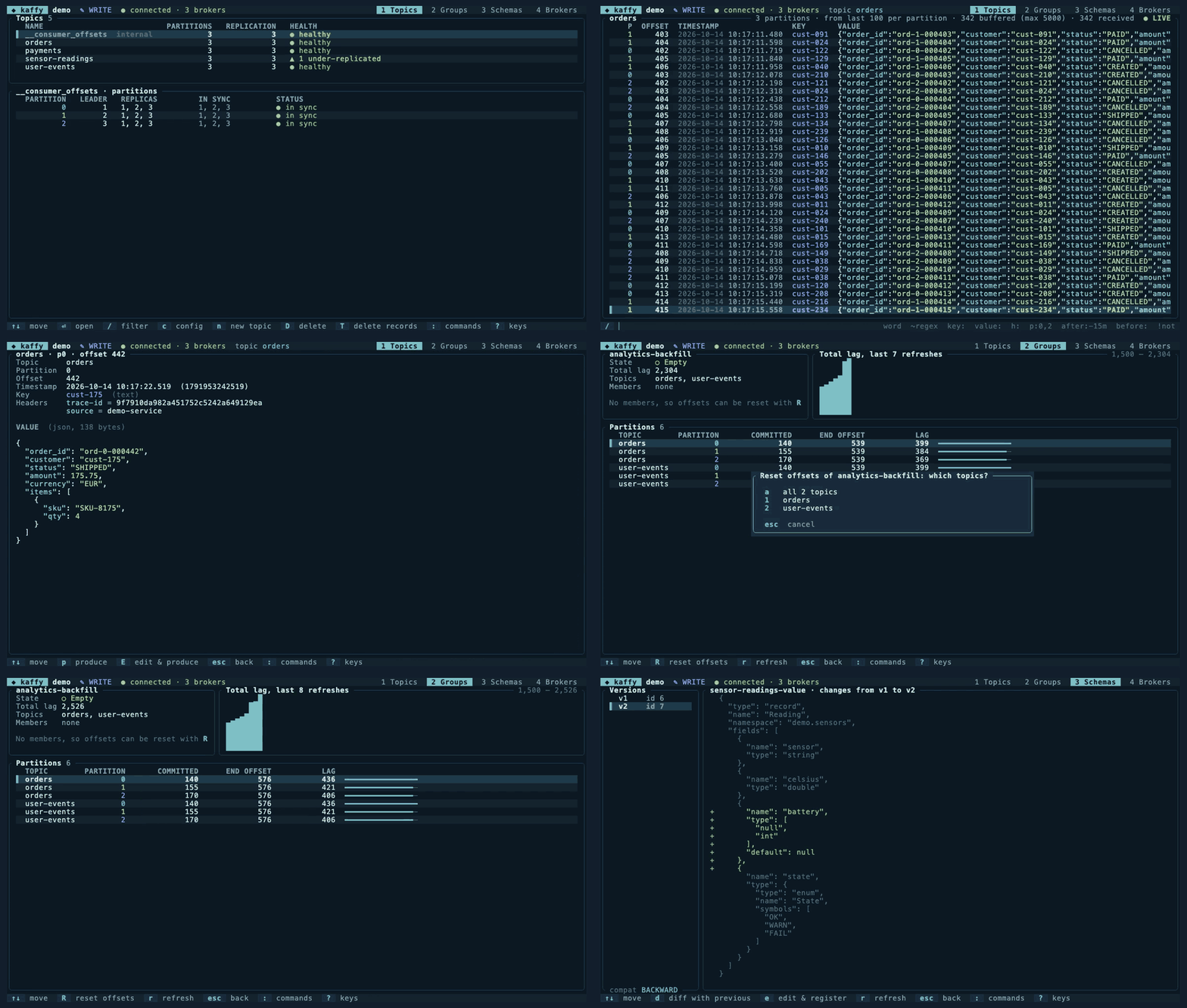
Recorded in kaffy --demo: open a topic from the command palette, filter it to paid or shipped orders on two partitions, read one message, check a stopped consumer group's growing lag, preview an offset reset without applying it, and diff two versions of an Avro schema. Also available as a GIF.
Tested at scale
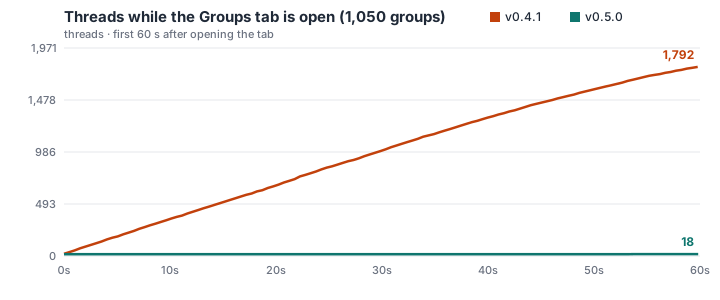
kaffy 0.5 was timed on a cluster with 2,000+ topics, 6,000+ partitions, 5.3 million messages, over 1,000 consumer groups and 200 live consumers, twice: on one broker on the same machine, and on three brokers reached over SASL_SSL through a 30 ms round trip, like a cluster in the cloud. A script drove kaffy and timed what appeared on screen.
| Local broker | 3 brokers, SASL_SSL, 30 ms away | |
|---|---|---|
| Topic list | 0.30 s | 0.66 s |
| All 1,000+ consumer groups with lag | 0.23 s | 0.83 s |
| One group's lag per partition | 0.07 s | 0.18 s |
| A page of history from offset 0 (1M-message topic) | 0.07 s | 0.47 s |
| The next page | 0.50 s | 0.53 s |
| Memory, groups tab open | 31 MB | 31 MB |
| Threads / open sockets | 18 / 21 | 19 / 27 |
| CPU, groups tab open | 3.3 % | 2.5 % |
Lag matched Kafka's own kafka-consumer-groups exactly. On shared clusters, show only what you work on with topics = ["checkout-*"] and groups = [...] in a profile, or --topics and --groups for one run.
Compared with 0.4.1
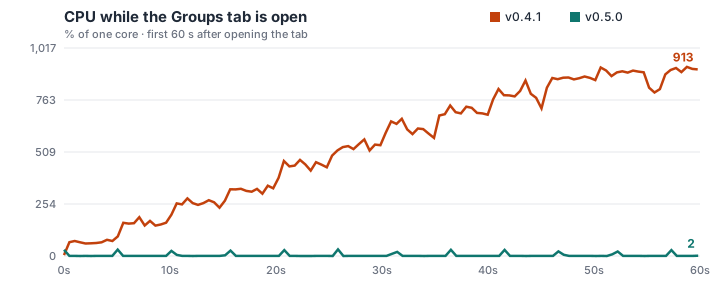
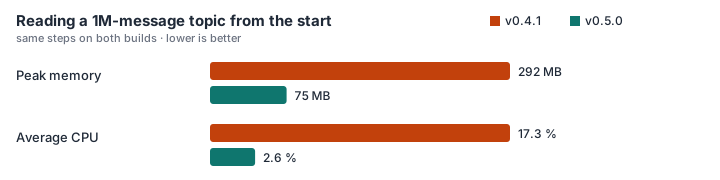
These tests found that 0.4.1 didn't scale: on the local broker it never showed the 1,050-group list (still empty after 400 s), used about 9 cores, 3,440 threads and 6,685 sockets, and jumped to the newest messages instead of the start of a big topic. 0.5.0 fixes all of it. The release notes have the details.

Measured on a MacBook (Apple Silicon, 10 cores) running the brokers too. The 30 ms delay is fixed, with no loss or jitter; a real network varies more. Not yet tested: tens of thousands of partitions, and Confluent Cloud or MSK themselves. The numbers are in metrics.json.
Install
The install script picks the build for your system, downloads the latest release, checks its SHA-256 checksum and puts kaffy in ~/.local/bin. It works with sh and bash, on Linux and macOS.
curl -fsSL https://prasenjithiwale.github.io/folio/kaffy/install.sh | sh
Homebrew
On macOS or Linux, install from the prasenjithiwale/tap tap. Homebrew loads formulae from other people's taps only once you trust them, which is the first command:
brew trust --formula prasenjithiwale/tap/kaffy && brew install prasenjithiwale/tap/kaffy
Then brew upgrade kaffy picks up new releases.
Options
Set these before sh to change what the script does:
curl -fsSL https://prasenjithiwale.github.io/folio/kaffy/install.sh | KAFFY_VERSION=v0.5.0 KAFFY_INSTALL_DIR=/usr/local/bin sh
KAFFY_VERSION- Install a specific release instead of the latest.
KAFFY_INSTALL_DIR- Where to put the binary. Defaults to
~/.local/bin; a system directory may needsudo sh.
Requirements
Linux on x86_64 or arm64, any distribution: the binary is static, so Alpine and older systems work too. macOS 11 or newer, on Apple Silicon or Intel.
Manual download
Download the archive for your system and compare it with its SHA-256 checksum:
The first release is being published. Check back in a few minutes.
Uninstall
Delete the binary: rm ~/.local/bin/kaffy, or brew uninstall kaffy if Homebrew installed it. kaffy keeps its config in ~/.config/kaffy and its log in ~/.cache/kaffy.
Get started
Try it without Kafka
kaffy --demo runs against a built-in fake cluster with live data, including Avro messages, a small Schema Registry and topic configs.
Connect to a broker
kaffy --bootstrap localhost:9092 connects without any setup. Add --schema-registry http://localhost:8081 to decode Avro, JSON Schema and Protobuf.
Save your clusters
Describe clusters in ~/.config/kaffy/config.toml, then pick one with kaffy --profile staging. Profiles support SSL, mutual TLS and SASL (PLAIN, SCRAM), and read passwords from environment variables rather than the file.
[profiles.staging]
bootstrap_servers = "broker-1.staging:9094"
security_protocol = "sasl_ssl"
sasl = { mechanism = "SCRAM-SHA-512", username = "svc-kaffy", password_env = "KAFFY_STAGING_PASSWORD" }
schema_registry = { url = "https://schema-registry.staging:8081" }
Cloud clusters
Confluent Cloud works with an API key over SASL/PLAIN. Amazon MSK with IAM access control needs only the region; kaffy signs the tokens with your AWS credentials, including SSO and assumed roles through the AWS CLI:
[profiles.msk]
bootstrap_servers = "b-1.mycluster.abc123.c2.kafka.eu-west-1.amazonaws.com:9098"
security_protocol = "sasl_ssl"
aws_msk_iam = { region = "eu-west-1", profile = "msk-dev" }
Protobuf without a registry
For topics carrying plain Protobuf, point a profile at the .proto files. kaffy compiles them itself, so protoc isn't needed.
[[profiles.staging.protobuf]]
topic = "orders-proto"
files = ["proto/orders.proto"]
include = ["proto"]
value = "acme.Order"
Only your topics and groups
On a shared cluster, a profile can list what to show. Patterns use * and ?, and a leading ! leaves names out. --topics and --groups do the same for one run. This narrows the view; use Kafka ACLs to restrict access.
[profiles.staging]
topics = ["checkout-*", "payments", "!*.dlq"]
groups = ["checkout-*"]
Using kaffy
| / | Filter messages |
|---|---|
| space | Pause or resume the live tail, or read the next page of history |
| b e | Read from the beginning a page at a time, or follow only new messages |
| o t | Jump to an offset, or to a time such as -15m |
| enter | Open a message |
| y Y | Copy the value or key |
| p E | Produce a message, or edit this one and produce it |
| K | Produce a tombstone for this key |
| X | Replay messages into a topic |
| x | Export the shown messages |
| 1 | Topics, where c shows the config, n creates a topic, D deletes one and T deletes records |
| 2 | Consumer groups, where R resets offsets |
| 4 | Brokers and partition health |
| : | Command palette: run a command or jump to a topic, group or subject |
| 3 | Schemas, where d diffs versions, e edits and n registers a new subject |
| ? | All keys of the current screen |
| esc | Go back |
Make it yours
kaffy has dark and light themes, and uses your terminal's 16 colors where true color isn't available. Pick one with --theme or theme = "light" in the config. Any key can be rebound in a [keys] table, and the help and footer show your keys:
[keys]
pause = "p"
produce = "P"
Filter examples
cust-042- Key or value contains the text, ignoring case.
~"status":"(PAID|SHIPPED)"- Key or value matches a regular expression.
key:cust- h:trace-id- Search only the key, value (
value:) or headers. p:0,2 after:-1h- Partitions 0 and 2, from the last hour.
before:works too. !cancelled- Leave out matching messages.
Making changes
Every change shows exactly what will happen and waits for y. On profiles marked prod = true you type the group or topic name instead. Profiles are read-only unless you set read_only = false, and kaffy never joins a consumer group just to read, so browsing moves no one's offsets.
- Reset offsets
- Move a stopped consumer group to the earliest or latest offset, a point in time, or a specific offset, on all its topics or one. The preview shows how many messages will be processed again or skipped.
- Produce
- Write a message in your
$EDITOR: key, headers, partition and value. Editing an Avro message keeps it Avro. - Replay
- Copy a range of messages, by offset or time, into the same or another topic. The current filter applies, so you can replay only the messages you are looking at.
- Schemas
- Edit the latest schema of a subject in your
$EDITOR, or start a new Avro, JSON Schema or Protobuf subject. kaffy checks compatibility with the registry, shows the diff, and registers only when you confirm. - Topics
- Create and delete topics, and change their configs. kaffy reads the config back to confirm a change took effect.
- Delete records
- Remove everything before an offset or a time. Like deleting a topic, this can't be undone, so it always asks you to type the topic name, on every profile.
- Tombstones
- Produce a null value for a message's key, which deletes the key on compacted topics.
- Export
- Save the shown messages as JSON, NDJSON or CSV. Works on read-only profiles too.
Try all of it safely with kaffy --demo, whose fake cluster accepts changes.